

You need tools that let you focus on strategy while routine work runs itself. AI Employee is designed to act like a dependable team member inside HighLevel, combining voice, chat, content, funnels, reviews and workflow automation so you can answer calls, nurture leads, manage reputation and run campaigns on autopilot.
This guide explains why adopting an AI-driven assistant matters for your small business, how it reduces friction across operations, and what to watch for when deciding if it fits your workflows.

You get an AI-powered teammate that lives inside HighLevel and handles a lot of the day-to-day work you usually have to babysit. It answers calls, chats with leads, handles review requests, creates content and funnels, and triggers workflows so follow-ups happen without you remembering every step.
For everyday use you’ll find it great for routing calls, qualifying prospects, and keeping conversations moving. For bigger pushes — like a seasonal campaign or a new service launch — it can draft content, run nurture sequences and monitor reputation while you focus on delivery.
If you want fewer repetitive tasks and more predictable lead handling, it’s worth trying as a practical, time-saving assistant.
What People Say
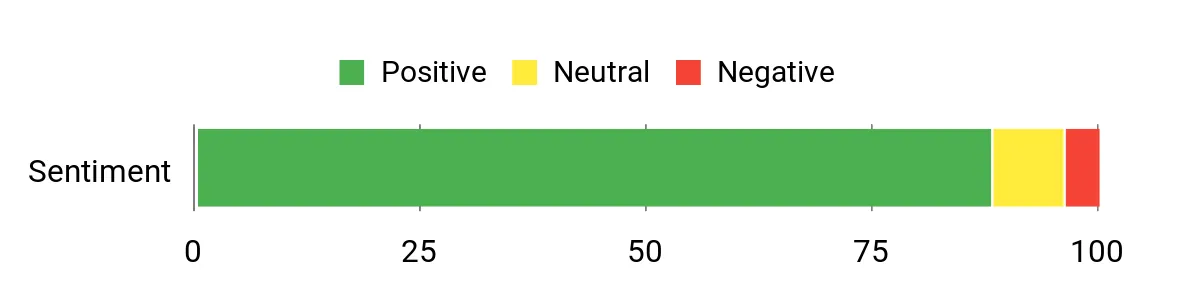
Users often highlight that the AI cuts down on time spent chasing leads and keeps conversations moving even when the team is busy. Feedback focuses on real workflow wins — fewer missed calls, quicker follow-ups, and content generation that gets campaigns off the ground faster.
Overall Sentiment: Positive
🗣️ Sam B.
The AI actually answers inbound calls and captures lead details before I even open the dashboard. It routes the call info into workflows that immediately start follow-ups, so I stopped losing hot leads during busy hours.
🗣️ Lina M.
We used it to run a small promotion — it generated the landing content, handled chat qualification and pushed the best leads into appointments automatically. Saved our team dozens of manual steps every day.
| Pros | Cons |
|---|---|
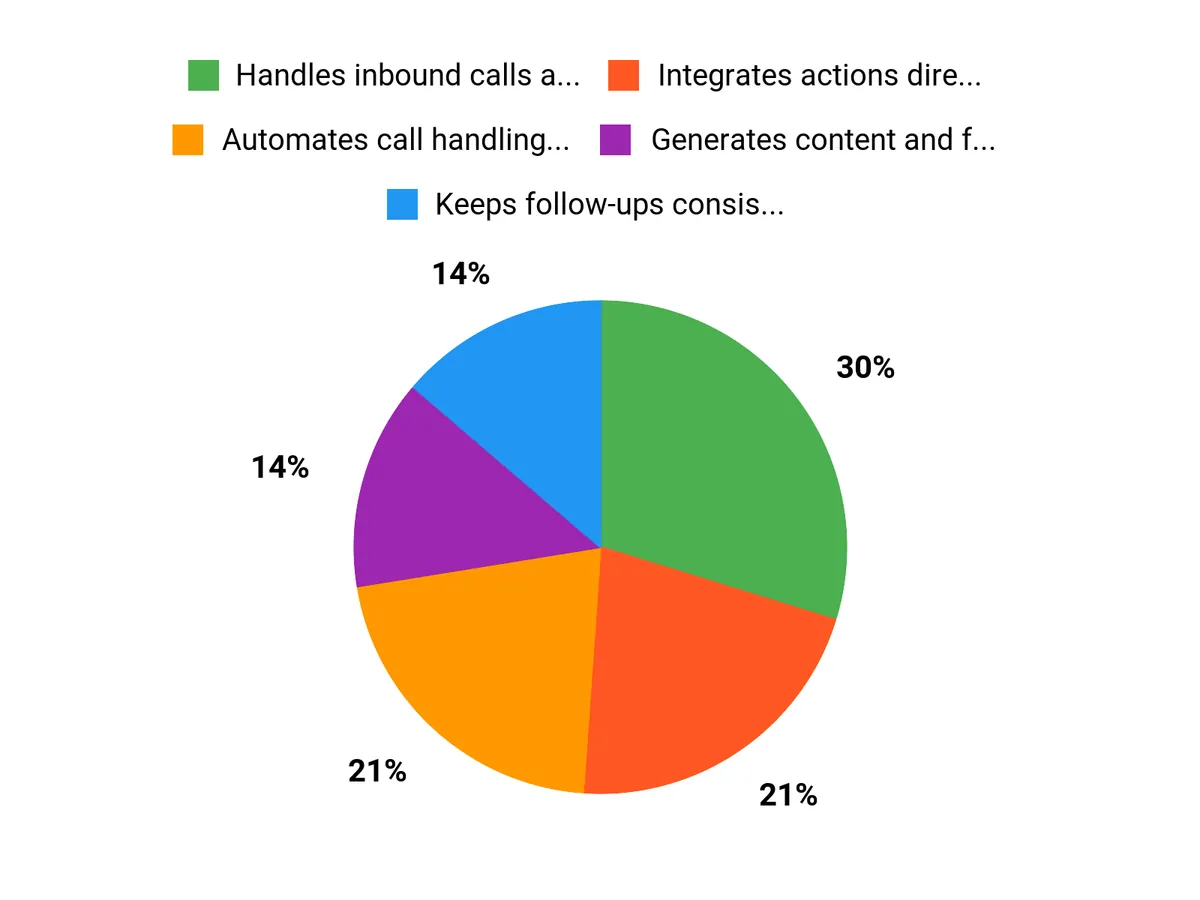
| ✅ Handles inbound calls and chats reliably | ❌ Takes time to fine-tune conversational scripts |
| ✅ Integrates actions directly into HighLevel workflows | ❌ Effectiveness depends on how well your workflows and templates are set up |
| ✅ Generates content and funnels quickly | ❌ Some advanced integrations may require additional setup |
| ✅ Improves response times and lead nurturing consistency |
Return On Investment
You’ll likely see ROI through saved staff hours, fewer missed leads, and more consistent follow-up — in many cases time savings and improved conversion rates cover the setup effort within a few weeks to months, depending on your lead volume and how thoroughly you configure workflows.
Situational Benefits
| Situation | How It Helps |
|---|---|
| High inbound call volume | The AI answers, captures lead info and routes details into workflows so hot leads are followed up automatically even during peak times. |
| Limited marketing staff | It generates landing pages, content snippets and nudges prospects through nurture sequences, reducing the need for extra hires. |
| Reputation management | Automates review requests and monitors responses so you can address issues quickly and keep ratings healthy. |
Ease Of Use
| Feature | Ease Level |
|---|---|
| Call Handling Setup | Moderate |
| Workflow Automation | Moderate |
| Content & Funnel Creation | Easy |
| Review Management | Easy |
Usability
| Aspect | Ease Level | Notes |
|---|---|---|
| Onboarding | Moderate | You’ll want to walk through templates and sample dialogues to tailor responses to your brand. |
| Daily Operation | Easy | Once set up, the system runs tasks and hands you summarized actions to review. |
| Customization | Moderate | Custom scripts and advanced routing need attention but enable much better performance. |
Integration Capabilities
| Software | Integration Quality |
|---|---|
| HighLevel CRM | Excellent |
| Google Calendar | Good |
| Twilio (calls & SMS) | Good |
| Zapier | Good |
Automation Capabilities
AI Employee automates call answering, lead qualification, follow-up sequences, review requests, and campaign triggers by tying actions directly into workflows so repetitive tasks run without manual oversight.
Reporting & Analytics
You get standard performance summaries — lead capture rates, response times, campaign engagement and review trends — presented inside HighLevel so you can see what’s improving and where to tweak scripts or funnels.
Key Benefits
- Automates call handling and lead qualification
- Keeps follow-ups consistent with workflows
- Creates content and funnels on demand
- Monitors and manages online reviews
- Reduces manual busywork so you focus on closing
Rating: 4.8/5
FAQ
How Does AI Employee Improve My Small Business Operations?
You gain a single platform that handles routine tasks so you can focus on growth. AI Employee is an all-in-one AI-powered business assistant inside HighLevel that combines voice, chat, reviews, funnels, content, and workflow automation to answer calls, nurture leads, manage reputation, and run campaigns on autopilot.
You’ll see immediate efficiency gains when it automates repetitive tasks like lead follow-up and appointment confirmations, improves response times to increase conversions, and frees your team for higher-value work. Users report smooth adoption and strong outcomes, with many giving the product a 4.8/5 rating, which reflects real improvements in consistency and customer experience.
What Should I Consider Before Adopting An AI Employee?
You should evaluate fit, integration, and change management so deployment delivers measurable results. Confirm that the AI Employee connectors and workflows map to your current CRM and marketing tools, that you can customize voice and messaging to match your brand, and that support and onboarding resources meet your needs.
Clarify data handling and compliance expectations with your vendor, define the metrics you’ll track to measure success, and plan a phased rollout that lets you pilot critical workflows before scaling. Treat the AI as a force multiplier, not a replacement, and ensure you have a clear process for human escalation when conversations need judgment or nuance.
How Do I Use AI Employee Effectively And Maintain Accuracy And Security?
You should start small, monitor performance, and iterate to protect both quality and privacy. Begin by automating a single high-volume workflow so you can tune prompts and templates, then expand once you measure improvements in conversion and time saved. Implement human-in-the-loop checks for complex interactions, set clear escalation paths, and schedule regular audits of responses and campaign logic.
Ask the vendor about encryption, access controls, and data retention policies to ensure data privacy meets your standards, and use role-based permissions to limit exposure. Finally, track key metrics and customer feedback so you continuously refine automation and demonstrate ROI to stakeholders.
Why Choose AI Employee
You should choose AI Employee because it automates repetitive tasks, lowers operating costs, and gives you consistent 24/7 support that integrates smoothly with the tools you already use. Customers prefer it for how quickly it frees your team to focus on strategy and customer care, scales with your growth, and delivers noticeable improvements in productivity and service.
Wrapping Up
AI Employee is built to let you offload repetitive but essential work so you can focus on growth. By combining voice, chat, content and workflow automation inside HighLevel, it helps you answer calls, nurture leads, manage reputation and run campaigns with less manual oversight.
With a strong user rating (4.8/5) and deep platform integration, it can be a practical step toward more predictable lead flow and better customer experiences. If you want to reclaim time and improve consistency across sales and service, AI Employee is worth evaluating as part of your automation strategy.
This Roundup is reader-supported. When you click through links we may earn a referral commission on qualifying purchases.
